I wrote an article about installing a ROM (customized software) on the HP TouchPad. The ROM was Xron which is a variant of CyanogenMod 7 (Android 2.3). The developers, ClassicNerds, do have their own version of Android 4.0 (CM9 variant) but I have not had a chance to download and test it. However, many people are running CM9 (Android 4.0) on their HP TouchPad. For those not familiar with CyanogenMod, it is "an aftermarket firmware ... based on the open-source Android operating system. The CM team has progress in getting the OS to work. This is an Alpha 2 so there are still many bugs and some things do not work.

Focusing exclusively on Tablets: News, Reviews & Information
Showing posts with label TouchPad. Show all posts
Showing posts with label TouchPad. Show all posts
Saturday, April 14, 2012


Saturday, January 21, 2012
HP TouchPad on Android (CM7 Xron Beta vB2.9)
I was one of the lucky ones who was able to purchase the TouchPad during HP's first fire sale. I bought the 32GB version for $150. Although I like webOS and the amount of apps available are decent, I felt it was not enough. However, I was not interested in porting Android especially since the software was still in an Alpha stage (almost experimental stage with many bugs). I did use my TouchPad a lot in the beginning but lately was becoming more like a paper weight. I found the development of CM7, a popular ROM that is available for many devices, to be slow. However, I discovered a variant of the CM7 Android port called XRON. With decent reviews, I decided to give it a try.
I have been installing ROMs on my Droid X for a long time so I was very comfortable installing Xron on my TouchPad. Since you will still able to boot into webOS, it is nice to have this dual boot feature. (You can obtain the links and instructions on installing CM7 Xron from XDA-Developers, a popular forum where developers posts hacks, customized ROMs and exchange information.). So what do I think of CM7 XRON vB2.9, continue reading...
I have been installing ROMs on my Droid X for a long time so I was very comfortable installing Xron on my TouchPad. Since you will still able to boot into webOS, it is nice to have this dual boot feature. (You can obtain the links and instructions on installing CM7 Xron from XDA-Developers, a popular forum where developers posts hacks, customized ROMs and exchange information.). So what do I think of CM7 XRON vB2.9, continue reading...
Monday, August 29, 2011
Things to do with your new TouchPad; Part 2 - Recommended Apps
Part 1 of our TouchPad series focused on some first things to do with your new TouchPad. Part 2 focuses on Apps. Since many new TouchPad buyers are new to webOS, finding great apps to install on your new TouchPad is important. Although the selection for TouchPad apps is limited, about 70% of 8,000 webOS phone apps can be used on the tablet. Hopefully now that an estimated 500,000 TouchPads are in consumer's hands, these webOS developers can continue creating new webOS apps or at least upgrading the current ones available. TabletConnect has done the work to narrow down the good ones. We have gone to various sites and webOS experts to get their recommendations on the best webOS apps for your new TouchPad. Let's begin:
Wednesday, August 24, 2011
Things to do with your new TouchPad: Part 1
(8/27/11 Update: I have made some clarifications below thanks to additional information that I obtained.)
Since HP had a fire-sale on its discontinued TouchPad, it has become the best selling tablet (after Apple's iPad). It is estimated that 500,000 units were sold. However, most people are not familiar with webOS so I put together a series of articles. The first part will provide some tips on what to do first with your new TouchPad. Part 2 will provide some recommended apps to have. Part 3 will provide information on different "hacks" for your TouchPad. Here is Part 1 of our series:
Since HP had a fire-sale on its discontinued TouchPad, it has become the best selling tablet (after Apple's iPad). It is estimated that 500,000 units were sold. However, most people are not familiar with webOS so I put together a series of articles. The first part will provide some tips on what to do first with your new TouchPad. Part 2 will provide some recommended apps to have. Part 3 will provide information on different "hacks" for your TouchPad. Here is Part 1 of our series:
Sunday, August 21, 2011
Editorial: HP TouchPad - Dead or Alive?
With HP announcing that they are discontinuing the TouchPad and putting webOS on hold, Apple has claimed another victory against its competitors. The TouchPad never had a chance against the iPad or the many Android Honeycomb tablets as it intended to compete in that higher-price market. Having seen many tablets come and go since the first iPad was launched, a company claiming defeat after only 6 weeks on the market is the most shocking event I have witnessed in this still young tablet market. What is even more shocking is HP's dramatic price cut ($99 for 16GB & $150 for 32GB)? Whether intentional or not, we believe this is a good move. Why? Read on.
Sunday, July 24, 2011
HP TouchPad: First Impressions
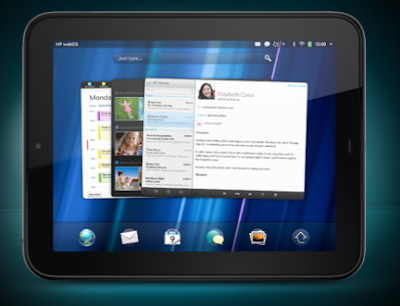
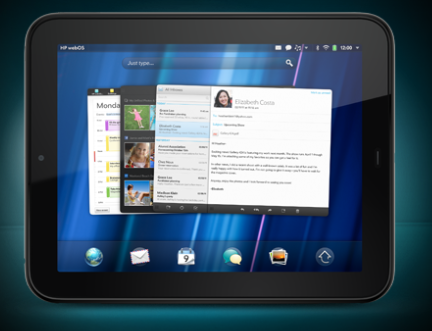
I had the opportunity to briefly use the HP TouchPad. It is a nice looking tablet that utilizes HP's webOS, a true multitasking OS. It works very similar to RIM's PlayBook although HP claims RIM took this concept from them. In any case, one can have multiple apps open and running at the same time. What I really like is the fact that one can see the open apps in a large preview screen. In addition, the app still runs except for games which automatically pauses (at least the Glow Hockey game that was demoed). So basically you can open a browser and wait for it to load then switch to your email to read a new one. The browser will still load although you are checking your emails. Then you can easily go back to the browser. When you are done with an app, you can flick it away. Again, works very much like the PlayBook.
Subscribe to:
Posts (Atom)